Compare schema snapshots
Compare the current schema with a saved snapshot, grouped by cause, and tick off what you planned.
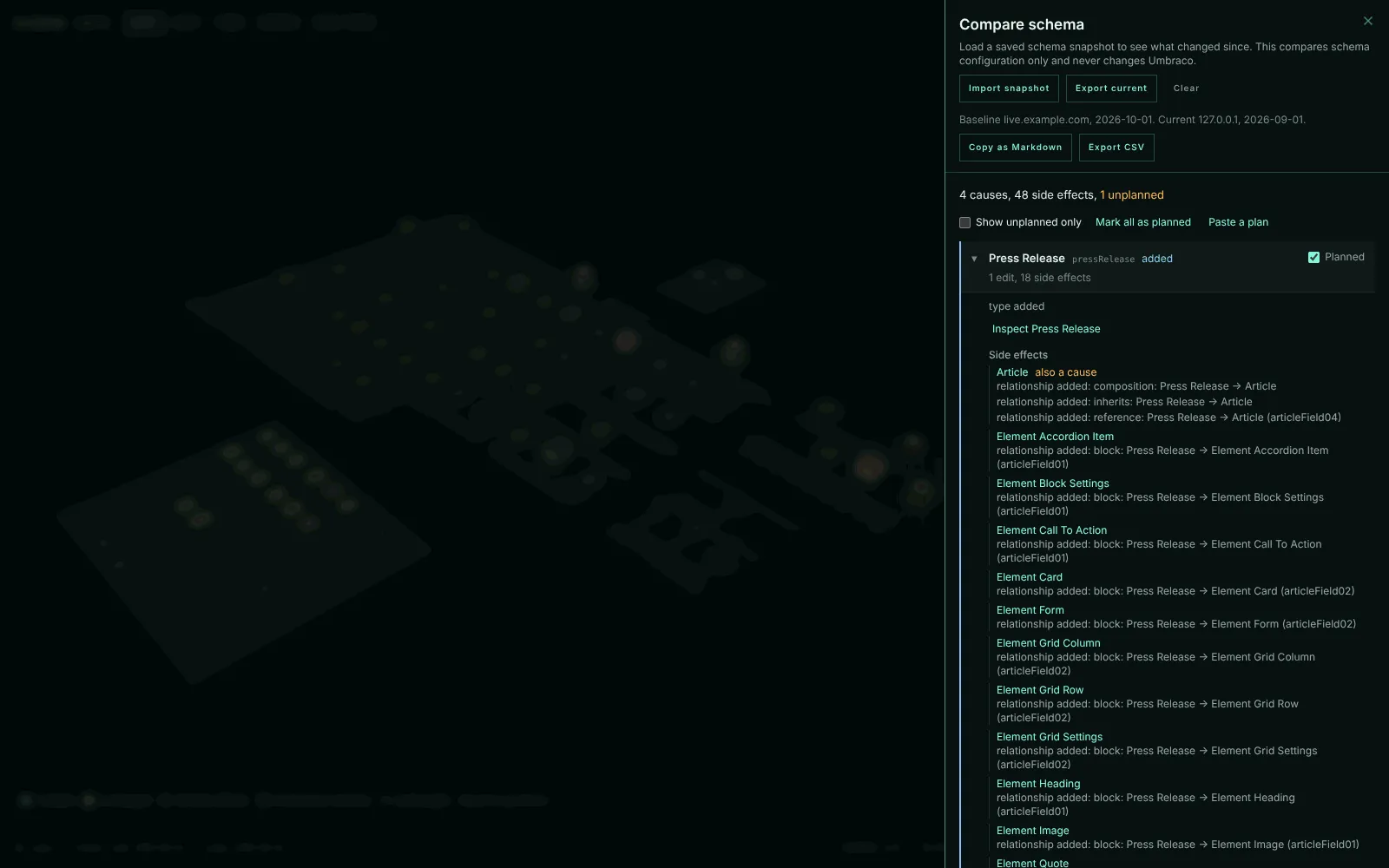
Compare shows what changed between the current schema and a saved snapshot. Use it to check that a change did what you planned and nothing else, or to see how two environments differ.
Export a snapshot
Open Compare and export the current schema before you make a change. The file is named after the site and the day, such as schema-city-snapshot-example-com-2026-10-07.json, and records the host it came from.
Make your change
Edit the schema in Umbraco as usual.
Import it as a baseline
Import the file in Compare. To compare environments instead, export on one and import on the other.
Causes and side effects
One edit can change many types. Add a property to a composition, and every type that composes it changes too. Compare groups the changes so you can tell the edit from what it caused.
A cause is a type with edits of its own:
- the type was added or removed
- properties were added, removed or changed, or a property got a new Data Type
- its groups or tabs changed
- its compositions, allowed children, or block or picker targets changed
A side effect is a type that only changed because of a cause, and sits under it:
- every type that composes or inherits a composition whose properties changed
- every Element Type whose incoming block relationship changed because a host’s block list did
- every type whose incoming picker or allowed-child relationship changed, and every parent that gained or lost an allowed child because that child type was added or removed
A type with an edit of its own stays a cause even when it is also a side effect, and says what else it is a side effect of. Every change sits under the causes that explain it, so nothing is dropped. The summary reads, for example, “4 causes, 48 side effects, 1 unplanned”.
Mark what you planned
Tick each cause you planned with its Planned box, use Mark all as planned, or Paste a plan as a list of type aliases. Show unplanned only then leaves the changes nobody asked for. The plan lasts as long as the baseline does.
- Copy as Markdown gives a ticket-ready list, with both snapshots’ hosts and dates, the totals, each cause ticked when planned, and its side effects nested under it.
- Export CSV gives one row per line, with the cause it belongs to, whether it is the cause’s own edit or a side effect, and whether it was planned.
See the changes in the city
While a baseline is loaded, the city shows a change layer and dims everything else:
- added types are azure
- types changed by their own edit are amber with a ring
- side effects are a quieter amber
- removed types are outlines where they stood
Choosing a lens replaces the change layer until the lens is off again. Show in city, from the Impact page or a Data Type, replaces it until you clear it. The List view gets a Change column, sortable and filterable, with a row for each removed type.
Matched buildings keep their baseline positions. New types appear on separate added boards.